
Book online and pay by card
- Where to book
- Book while logged in as a member on SRT’s official D-Ticket website (dticket.railway.co.th)
- How to pay
- Credit or debit card
- Receive your ticket
- Your ticket is emailed after payment
Book Thai train tickets through D-Ticket, the State Railway of Thailand's official booking website. This guide explains how to choose a route, train, carriage and seat, pay, and change or cancel a booked ticket.
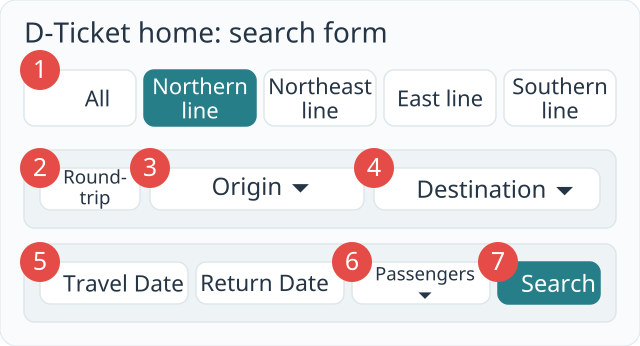
D-Ticket’s home screen has All, Northern line, Northeast line, East line and Southern line tabs. Choose Northern line for Chiang Mai; D-Ticket’s own guide also uses Chiang Mai as an example of this line.
Choose a route, departure and arrival stations, travel date and passenger count (1–4), then press Search. For a return ticket, tick the return option and enter the return date before searching. The first screen opens in Thai; choose English from the language menu at the top right to switch. The table below gives the meanings alongside the English and Thai interface labels.
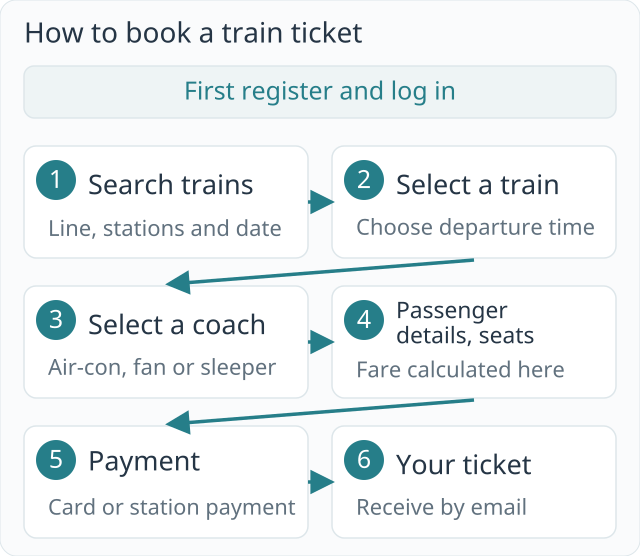
You must have registered and be logged in whenever you book on D-Ticket. Start with the Register or Login links at the upper right.
On the first screen, choose the route tab, departure and arrival stations, date and passenger count, then press Search to open the train list.
Press Select beside the train at your preferred time. To change the date or departure and arrival stations, use Change Search (เปลี่ยนแปลงการค้นหา) to go back and enter the details again.
Choose from air-conditioned, fan and sleeper carriages. Press Select beside your preferred carriage.
If you are the first passenger and the person making the booking, tick Same as Booker. Enter all required details for other passengers. A passenger with a membership code can enter it to earn points or receive discounts.
After entering the details and pressing Select Seat, the black bar at the bottom shows the fare calculation. A seat is assigned automatically at first; use the seat map if you want to choose another.
Check the booking summary again on the next screen. Go back if anything needs correcting; otherwise choose a payment method and press the payment button.
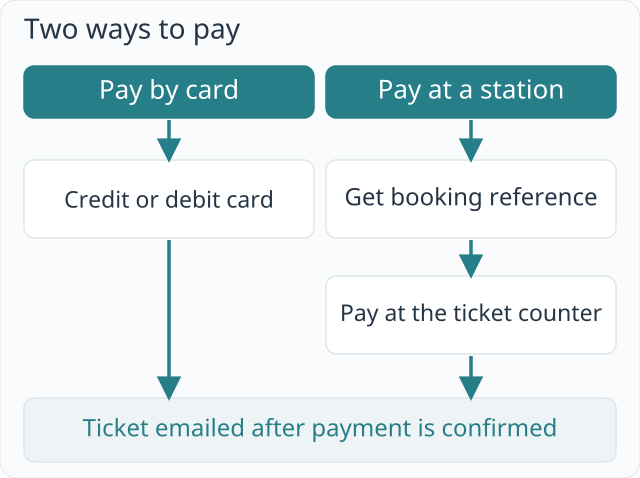
If you pay by card, your ticket is emailed to you. If you chose station payment, follow the payment instructions below.
When you pay by credit or debit card, the ticket is sent to your registered email address.
If you choose to pay at a station, D-Ticket provides a reservation number. Take that number to a station ticket office and pay; the ticket is emailed once payment is confirmed.
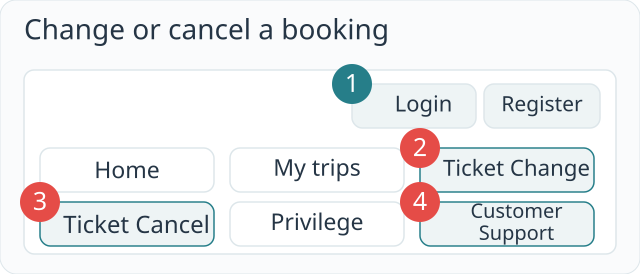
For either action, log in to D-Ticket. Start with Ticket Change or Ticket Cancel in the menu at the top of the first screen.
Tick the passenger to change in the booking list and press Change Journey at the bottom. Select the new travel details and seat. Any fare difference can be paid only by credit or debit card; after payment, the new ticket is emailed to you.
Tick the passenger to cancel in the booking list and press Cancel at the bottom. Review the ticket details, tick the box accepting the railway's cancellation terms and policies, then press Confirm Cancellation.
SRT intercity trains with reserved seats can be booked 90 days in advance. SRT announced on 24 April 2026 that it would reduce the window from 180 days to 90 days; this information was checked against Bangkok Post reporting. The announcement replaces the earlier split between 90-day and 30-day booking windows.
Commercial services such as Rapid, Express and Special Express can be booked 1–90 days before departure, depending on the distance.
Register and log in on SRT’s official booking website, D-Ticket (dticket.railway.co.th), to book. You need to be logged in each time you make a booking.
On D-Ticket’s home screen, select Northern line, then choose your origin and destination stations and search. Its guide also uses Chiang Mai as a Northern line example.
After entering passenger details and pressing Select Seat, the black bar at the bottom shows the fare calculation. Use Booking Details to see the breakdown again.
Card-paid tickets are sent by email. If you chose station payment, use the reservation number to pay at a station ticket office, then receive the ticket by email.
Choosing payment at a station on D-Ticket gives you a booking reference to use at the station ticket counter. The ticket is emailed after payment is confirmed.
Log in to D-Ticket and use Ticket Change or Ticket Cancel. If a change creates a fare difference, that difference can only be paid by credit or debit card.
SRT customer service can be reached on 1690. D-Ticket’s help screen lists the same number.
Yes. The first screen opens in Thai. Choose English from the language menu at the top right to change the menus and buttons to English. The comparison table on this page explains the menu names alongside their original English and Thai labels, so you can match each step to the booking screen.