
Is TDAC free?
Yes. There is no fee to submit TDAC on the Thai Immigration Bureau’s official site. Check that the address reads tdac.immigration.go.th before starting.
Completing TDAC on your phone? Put your passport, flight ticket and hotel confirmation beside you, then follow the screens below. Each step explains where names go, which Thailand date to use and how to copy your accommodation address. Once you submit successfully, save the document to your phone so it is easy to show at the airport.
Check that your address bar reads tdac.immigration.go.th. This is the Thai Immigration Bureau’s official website, and TDAC submission is free. It is a separate site from Thai e-Visa.
Submit within the three days before arrival, including the arrival date. You need a new TDAC every time you enter Thailand; a card from a previous trip cannot be reused. Before starting, have your passport, incoming flight number, local Thailand arrival date, accommodation address in English and email ready.
The site provides language settings, and your phone’s browser may also offer page translation. These controls can appear in different places depending on the phone and browser. English-speaking travelers can use the original English form shown below.
Whichever display language you choose, enter the details in English. Copy names and passport numbers from the passport, and use your accommodation’s English booking address. The mobile screenshots below retain the English button and field names so you can find each step.
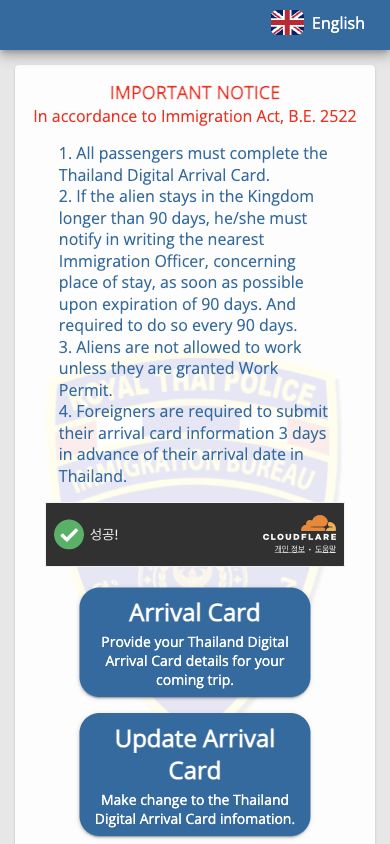
For a new submission, select Arrival Card. The neighboring Update Arrival Card button is for changing a record you have already submitted. Start with Arrival Card when you have not yet submitted this trip.
The opening screen also mentions 90-day reporting and work permits. This does not mean TDAC lasts for 90 days or gives you permission to work. Complete this trip’s arrival declaration through Arrival Card.
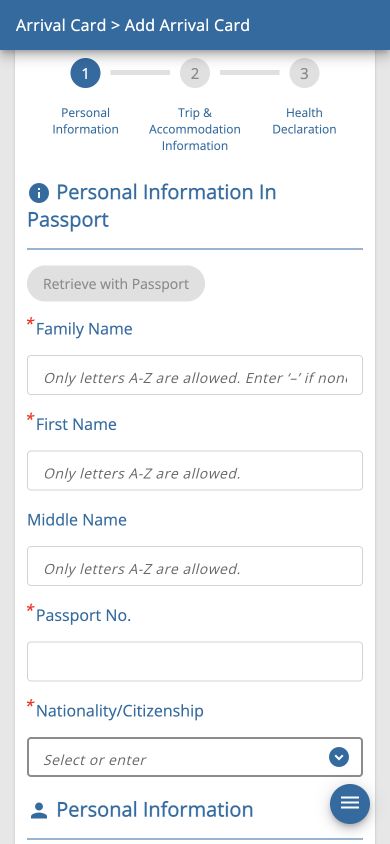
Enter your surname under Family Name and your given name under First Name. If you do not have a middle name in your passport, do not invent one to fill Middle Name. Put each part of the name in its matching field and copy the passport number into Passport No.
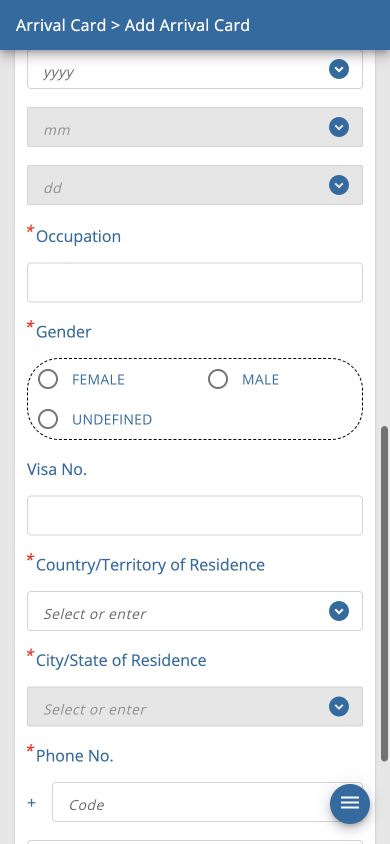
Nationality/Citizenship asks for citizenship; Date of Birth, Occupation and Gender ask for your birth date, occupation and gender. Country/Territory of Residence is where you currently live, and City/State of Residence is your city or state. A U.S. citizen living overseas should enter actual citizenship and residence separately.
Visa No. is for a visa already issued to you. If entering visa-free, do not invent a visa number. Follow the asterisks to distinguish required fields from optional ones. Phone No. separates the country code from your phone number. Select Continue after completing the page.
In the retained screenshot, Retrieve with Passport is unavailable. If the MRZ-reading feature described in the official guide is not available, enter your details manually. Even when it does read your passport, compare the names and passport number against the document.
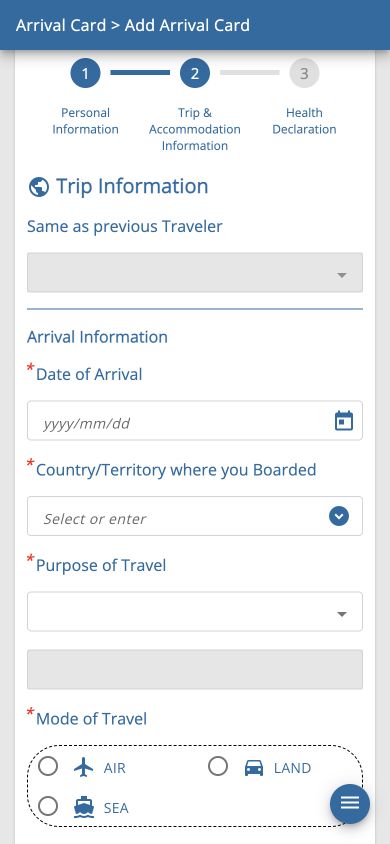
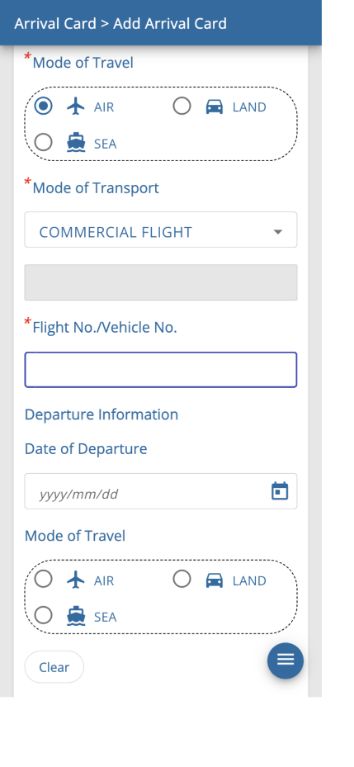
The trip stage has separate arrival and departure information for Thailand. Start with Arrival Information and look at your ticket. Find the local Thailand arrival date and incoming flight number, rather than copying the date you left the United States.
For a vacation arriving on a regular passenger flight, choose HOLIDAY, AIR and COMMERCIAL FLIGHT. These answers describe air travel for a holiday; business, study, land and sea arrivals must reflect their actual circumstances.
Type the English country name or three-letter code, then select the matching result from the list. If you boarded the Thailand-bound flight in the United States, search for USA and select USA : THE UNITED STATES OF AMERICA. Typing a code without choosing its list entry may not set the country.
Below the arrival fields is Departure Information. Its date and flight number concern leaving Thailand, rather than leaving the United States. With a round-trip ticket, copy the local Thailand departure date and flight number of your return flight.
Departure fields have no required asterisk in the retained screen. If you do not yet have a departure plan, do not make up dates or flight numbers. An optional form field does not remove the need to explain your return or onward plans at immigration.
Use Clear to remove a departure travel mode chosen by mistake. Read the section headings carefully so you do not confuse the arrival AIR option with departure AIR.
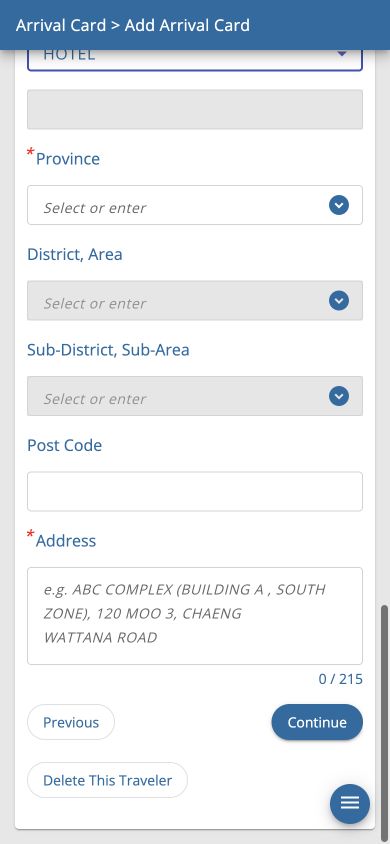
Open your hotel reservation and find the English accommodation address. This is where you will stay in Thailand, rather than your U.S. home address. Use the booking or hotel’s official address so the place name and administrative areas match.
Required fields may change with accommodation type. In the retained screen, selecting HOTEL removes the required asterisks from District and Sub-District. Follow the asterisks on your own form rather than assuming every accommodation type works the same way.
Select Province first, then District, Area, then Sub-District, Sub-Area to make the lower lists available. Choose entries matching the actual hotel address even when names look similar. For accommodation in Bangkok, Province can be BANGKOK.
I am a transit passenger, I don’t stay in Thailand concerns transit without a stay. Do not select it simply because you have not booked a hotel. It may be disabled depending on earlier answers. If you are entering Thailand for a stay, provide the actual accommodation details.
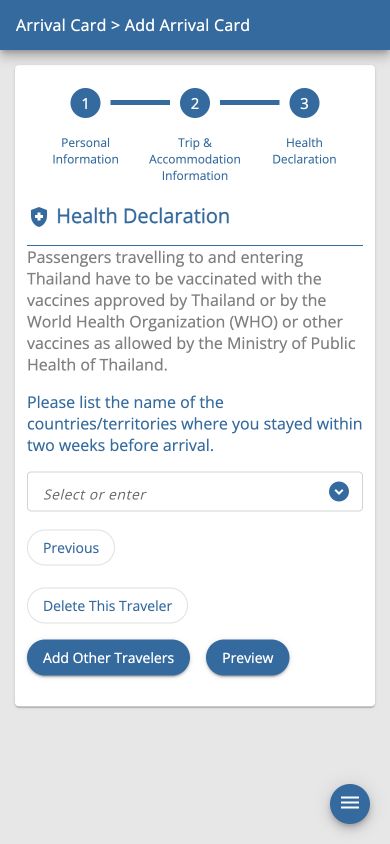
The health declaration asks for countries or territories where you stayed during the two weeks before arrival. If you have been living in the United States and leave directly, select the United States. Include any other countries where you actually stayed during that period. This field is not for Thai cities you plan to visit.
Type an English country name or code and choose the matching result. Citizenship, residence, the country of boarding and recent stays are different questions. If you are traveling between countries, do not automatically copy the same country into every field.
A vaccination notice refers to Thai Ministry of Public Health requirements. The official guide explains that additional health information may be requested depending on recent countries, boarding country, nationality or flight. Read and answer the questions shown for your own journey. The retained screenshot illustrates a route using Korea and does not establish that every traveler sees identical extra fields.
Select Preview when you finish. Previous returns to the preceding step, while Add Other Travelers adds another traveler’s record. Use each person’s actual travel history rather than copying one traveler’s countries to everyone.
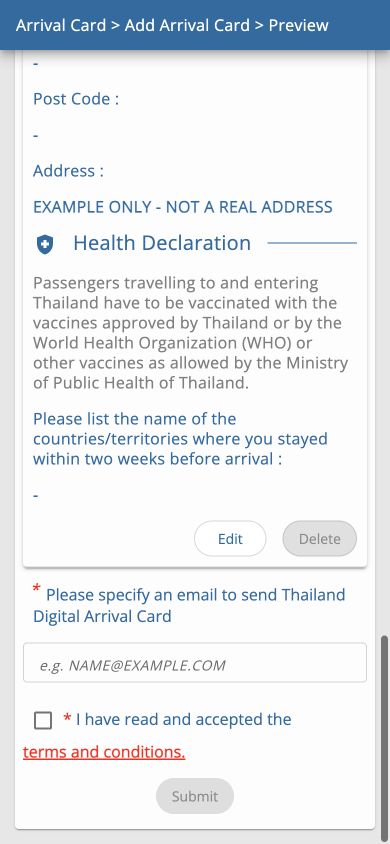
Review your name, passport number, nationality and birth date, plus arrival date, boarding country, arrival flight and accommodation address. Use Edit to correct anything wrong. EXAMPLE in the screenshot is demonstration data; no actual declaration was submitted.
Enter an email address you can receive mail at in the email field near the bottom. It is not a name field: read the spelling and both sides of the @ sign. Being able to open that inbox on your phone makes it easier to find the completed document.
Read Terms and conditions, check the box if you agree and choose Submit. The submission button is disabled without the required agreement. Reaching Preview does not complete submission.
If an error appears or the completed document does not show, do not treat the declaration as successfully submitted. Look for the actual success notice and TDAC document before saving them.
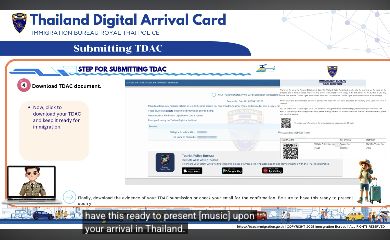
After successful submission, look for the success notice and TDAC download. The official video shows both. The retained image is a completion example from that official video, captured in a mobile browser. The video itself uses an older desktop screen, so its layout can differ from the current mobile form.
Download your document and compare the name, passport information and arrival date with your trip. Keep the declaration number, QR code and other confirmation details, and find the emailed copy too. Never use the sample number or QR code in the video as your own arrival document.
Save the file on your phone so it opens without internet access. Keeping the actual file, rather than just an email link, helps when the arrival airport connection is unreliable. You can also bring a printed copy if useful.
Have the confirmation available at entry and keep it during your stay. TDAC confirmation is not a visa or permission to enter. You still need to satisfy your visa or exemption conditions and pass immigration.
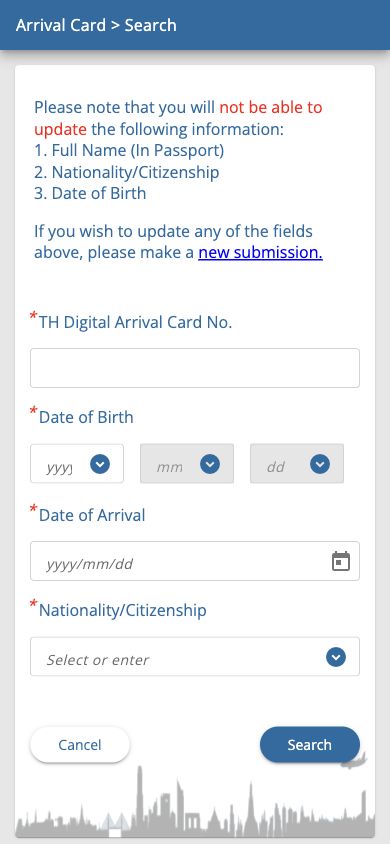
Choose Update Arrival Card from the opening screen. The retained search screen asks for the TDAC number, birth date, arrival date and nationality. Fill them in using your confirmation and passport, then select Search.
The official FAQ says passport name, passport number, nationality and birth date cannot be changed and advises a new form with correct details for those errors. Its release history separately states that passport-number editing was enabled; these statements conflict. For an incorrect passport number, seek clarification from Immigration rather than relying on an assumed editing rule. Correct other editable information, such as accommodation, before entry, resubmit and save the resulting document.
This screen searches for a declaration already submitted. If you have not submitted one yet, return to Arrival Card and start a new declaration instead of looking for a TDAC number.
Yes. There is no fee to submit TDAC on the Thai Immigration Bureau’s official site. Check that the address reads tdac.immigration.go.th before starting.
Yes. The screenshots here show the English mobile form. Regardless of your chosen display language, enter details in English using the passport and your accommodation’s English booking address.
Yes. U.S. travelers using visa exemption, children and infants each need a TDAC record. The requirement applies to non-Thai entrants. Transit without passing through Thai immigration does not require TDAC.
No. The arrival card and a visa are separate preparations. For visa-free tourism on a U.S. ordinary passport, satisfy the exemption conditions. For a purpose requiring a visa, obtain the appropriate visa as well.
Submit a new declaration with the correct name. The FAQ excludes passport name, passport number, nationality and birth date from editing, although its passport-number release note conflicts with that list. Ask Immigration about a passport-number error; use Update Arrival Card for other editable details before entry, then resubmit and save the result.
No. Flight No./Vehicle No. needs the airline code and number of the flight arriving in Thailand. It is not the booking reference or seat number.
No. Date of Departure under Departure Information is the local date your flight leaves Thailand. It may differ from the date you arrive in the United States; read the Thailand departure part of your ticket.
The retained screen removes their required asterisks after HOTEL is selected. Requirements can vary with accommodation type, so follow the asterisks on your actual form.
No. Choose countries and territories where you actually stayed during the two weeks before entering Thailand. It is not a list of future destinations.
No. Preview lets you review the form before submission. Enter your email, read the terms, submit after agreeing and look for the success notice and actual TDAC document.
Sources checked:
Last updated:
Latest deployment: